Cognos Framework Manager - User interface
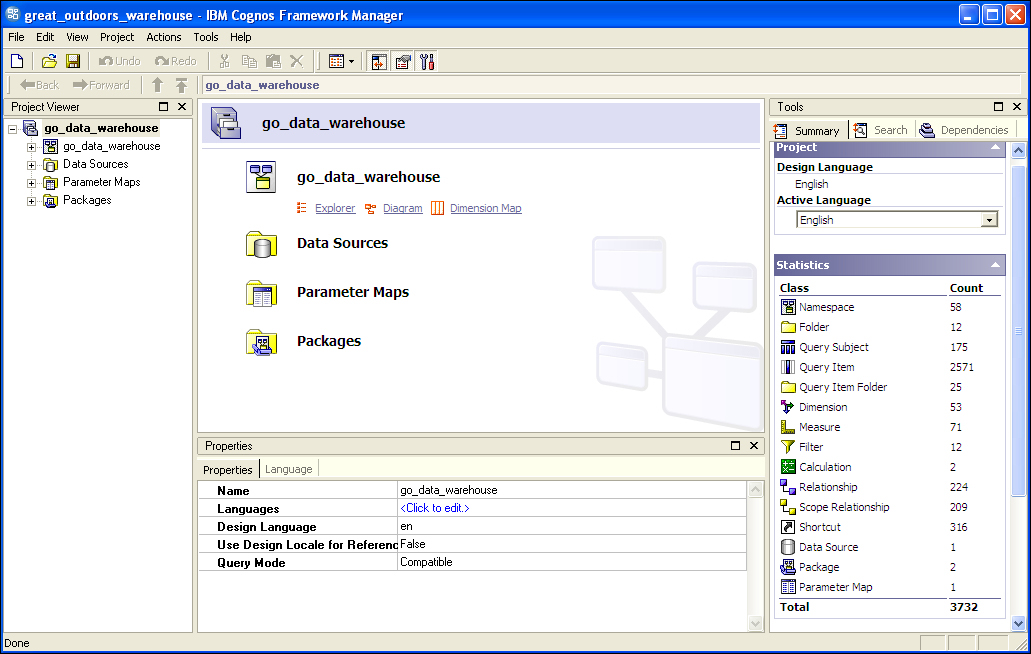
User interface Once you open the project, the main user interface screen is displayed: This is the project's work area, which shows an overview of the whole project. This page contains several additional panes that you can use to view and modify the objects in a project. The main Project pane cannot be hidden or moved. The Project Viewer, Tools, and Propertiespanes can be hidden or detached and moved around the work area. If you hide a tool panel, it can be restored by using the View menu. The Project Viewer pane The Project Viewer pane shows the project in a hierarchical view. You can use the Project Viewerpane to view, modify, and create objects. The Project Viewer pane uses various icons to represent different types of objects; these icons are described in more detail in the IBM Cognos documentation. Within this pane, the main objects are grouped in the project model. The Project Viewer pane starts with the project at the top level; additional levels wi...
